


More cyber-attackers are employing some level of credential theft over other types of cyber threats, according to Verizon’s 2022 data breach report. OWASP also listed ‘Identification and Authentication Failures’, i.e. systems permitting weak passwords, among the top 10 vulnerabilities in 2022. The recent data proves that credential protection, especially passwords, are essential to data security.
To secure and protect consumer passwords, top search engine Google has an in-built password manager, a strong password generator tool, and a brand new password-strength meter.
Although they’re late to the password-strength party where companies like LastPass, Kaspersky, and many others are already on the dance floor, Google’s advantage of breadth makes this latest password-strength meter something worth noting. Their service is built into the user’s browser. This means consumers can see their password strength on Chrome in real-time while creating a password.
How do password strength tools help overall IT security?
By default, users choose the easiest passwords they remember, or they remix their passwords across multiple sites. A recent Google survey found that 65% of consumers reuse their passwords in multiple logins. If a user’s PC gets hacked, even a personal device, company files and documents are at risk. Plus, there’s no stopping this bad user behavior from spilling into work credentials as well.
An older study from 2012 research has shown that password meters help users develop better password habits. A lot of users claim to not know what strong passwords look like, but building up some muscle memory with a consumer-focused tool like Google’s password strength meter could help these end-users get better at password generation overall.
The problem with simple passwords
Not to forget, even password generators or managers can be problematic for password security if they’re not complex enough. Currently, an eight-digit numeric password takes 1 second to be cracked. But the more complex a password is, the better—if you add symbols, case variation, and keep it long, the longer it would take to crack, even with advanced cracking codes and tools hackers use. Keeping track of complex passwords typically means employing a password manager to retain all that information, which is a good idea as both a consumer and an organization.
Here are some good off-hand best practices for end-users in your organizations:
- Length: Longer passwords are harder to crack than shorter ones.
- Complexity: Longer passwords with numbers, lower and capital cases, symbols, etc., would take longer to crack than long passwords without special characters
- Uncommon: If a password is long and includes symbols, but the characters are predictable, like PassWorddd123__@, it would be easier to crack when the password is random. This is why NIST suggests that instead of passwords, we should create uncommon passphrases like: “kiln harmony mockup outscore” that make sense to you and you alone.
Implementing password strength tools in your own Active Directory
Luckily, even your own Active Directory log-ins can benefit from password strength transparency with dynamic feedback at password change with Specops Password Policy tools.
This feedback helps users to choose stronger passwords and can help to reduce user frustration at the same time.
As a user enters a new password, the dynamic password feedback feature checks in real time to see whether or not the user’s chosen password aligns with the organization’s password policy. If the new password is not compliant with the policy then Specops Password Policy will tell the user where their password falls short and what they need to do t fix the problem.
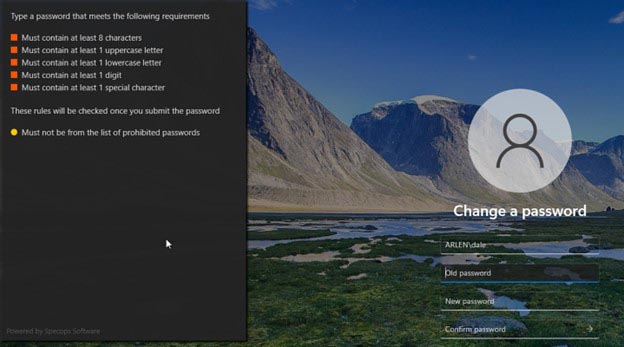
This prescriptive guidance will not only make the user’s lives easier, it may even reduce the number of password related helpdesk calls that your organization receives. You can test out Specops Password Policy in your Active Directory for free.
Combined with Google’s new password-strength meter, your end-users can get transparent feedback about their password hygiene on and offline—helping beef up your overall IT security.
