

What a DMARC Lookup Is and Why It Matters in 2026
By 2026, the rise in advanced email threats establishes DMARC lookups as a fundamental aspect of contemporary email security. A DMARC (Domain-based Message Authentication, Reporting & Conformance) lookup involves querying the Domain Name System (DNS) to access the DMARC record linked to a specific domain. This process allows organizations and security experts to determine how domain owners direct recipients to manage messages that do not pass authentication checks.
The importance of conducting DMARC lookups has intensified due to the rise in phishing attacks and business email compromise incidents. Domains lacking a valid and expertly configured DMARC record remain susceptible to unauthorized access and spoofing. This jeopardizes brand integrity and diminishes email deliverability. Regular DMARC assessments — utilizing tools for DMARC checks — are crucial for ensuring compliance and offering effective spoofing defenses.
Tools like EasyDMARC, mxtoolbox, and dmarcian automate the process of DMARC record lookups and validations. These diagnostic resources assist domain administrators, managed service providers, and security teams in confirming the existence, accuracy, and effectiveness of a DMARC record, enabling prompt identification of any issues related to the DMARC policy and alignment settings.
How DMARC Works with SPF and DKIM to Stop Email Spoofing
DMARC operates in conjunction with other protocols rather than functioning independently. It is built upon two key email authentication methods: SPF (Sender Policy Framework) and DKIM (DomainKeys Identified Mail). Recognizing how DMARC utilizes these components is crucial for understanding the security benefits that a DMARC check provides.
The Role of SPF and DKIM
SPF designates the mail servers authorized to send emails on behalf of a specific domain. This authorization is published through an SPF record as a DNS TXT entry, which identifies approved email senders and can be reviewed alongside a dmarc lookup tool to strengthen overall email authentication and security.
On the other hand, DKIM enables email senders to include a digital signature with each message. The recipient can confirm the authenticity of this signature by utilizing a public key that is made available in the sender’s DNS record.
DMARC: The Integrator and Enforcer
DMARC integrates SPF and DKIM protocols to establish a cohesive framework for validating domain authenticity:
- Alignment: DMARC mandates that the domains used in SPF and DKIM must match the “Header From” domain of an email. This requirement (with adkim for DKIM and aspf for SPF) prevents authentication from being circumvented by merely passing one of the checks through a different subdomain.
- Policy Distribution: Domain owners can dictate how to address emails that fail authentication through the DMARC policy (“p” tag), with options to do nothing, quarantine, or reject such emails.
- Reporting and Compliance: DMARC allows domain administrators to receive both aggregate and forensic reports to detect unauthorized usage and assess their progress towards achieving full DMARC compliance.
By enforcing both SPF and DKIM while providing a clear policy for handling failed messages, DMARC strengthens the domain-based message authentication mechanism to combat email spoofing effectively. Major platforms like Google and Yahoo now require DMARC implementation from senders to enhance user safety.
How to Perform a DMARC Lookup Step by Step
It’s important to conduct a DMARC record check whenever you set up, modify, or confirm the DMARC status for a domain. Below is a detailed guide to help you through the process:
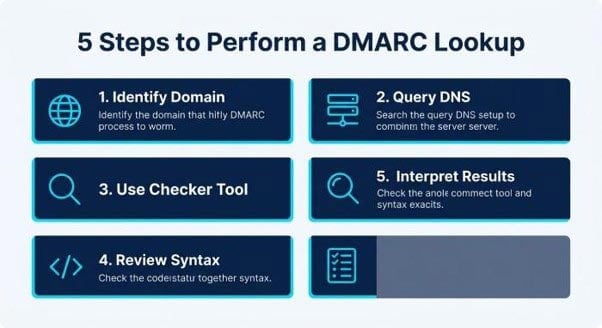
1. Identify the Domain Name
Determine which domain needs a DMARC verification. You have the option to use a DMARC record validator for both main domains and their subdomains.
2. Query the DNS for the DMARC Record
Each DMARC record is kept as a DNS TXT record at the subdomain: `_dmarc.domain.com`. While it is possible to retrieve them manually using command-line tools like “dig” or “nslookup,” many users opt for automated solutions through a DMARC checker.
3. Use a DMARC Record Checker Tool
Utilize DMARC diagnostic resources like:
- EasyDMARC: Offers validation, testing of DMARC records, and compliance insights.
- MXToolbox: Delivers quick checks and lookups for DMARC records.
- dmarcian and DMARC Inspector: Furnish thorough analysis of DMARC record syntax and policy.
All you need to do is input the domain name, and the DMARC checker will show the existing DMARC record.
4. Review the DMARC Record Syntax
Verify that the DMARC record contains the required tags:
- `v=DMARC1` (version)
- `p=none/quarantine/reject` (policy)
- `rua` (recipient for aggregate reports)
- `ruf` (recipient for forensic reports)
Additional DMARC tags can define alignment settings (adkim/aspf), reporting frequency (ri), and failure handling options (fo).
5. Interpret Results and Act
Examine the results to ensure proper DMARC configuration, evaluate policy robustness, and verify for any errors. If the DMARC record is absent, partial, or erroneous, make the necessary updates to ensure effective DMARC enforcement and enhance email security.
Understanding DMARC Lookup Results: Tags, Policies, and Common Errors
A DMARC record search uncovers a significant amount of information stored in the DNS TXT record. To achieve DMARC adherence and maximize domain security, it’s important to grasp the key elements that are typically found in standard DMARC verification results.
DMARC Tags and Syntax
The DMARC record follows a specific format and includes several essential tags:
- v (version): This must always be designated as DMARC1.
- p (policy): Indicates the action to be taken, which can be “none,” “quarantine,” or “reject.”
- rua/ruf: Specifies the destinations for DMARC aggregate and forensic reports.
- adkim/aspf: Determines the alignment modes for DKIM and SPF, either strict or relaxed.
- fo, rf: Outline the options and formats for failure reporting, such as afrf or iodef.
- pct: Indicates the percentage of emails that the policy applies to.
- ri: Defines the frequency at which aggregate reports are generated, measured in seconds.
Example DMARC Syntax
v=DMARC1; policy=quarantine; aggregate reports to=mailto:dmarc-rua@example.com; forensic reports to=mailto:dmarc-ruf@example.com; alignment for DKIM=strict; alignment for SPF=relaxed; percentage=100; reporting interval=86400 seconds.
Policy Distribution and Options
- none: Gathers reports without implementing any measures.
- quarantine: Emails that fail to meet standards are flagged as potentially harmful.
- reject: Completely denies unauthenticated emails – the most stringent level of security.
Common Error Checking Results
- Lack of DMARC Record: There is no DMARC policy available, which triggers an alert during validation checks.
- Syntax Issues: The DMARC record contains errors, like missing semicolons or invalid tags.
- SPF/DKIM Misalignment: The adkim or aspf settings do not correspond to the domain specified in the Header From.
- Invalid Reporting Addresses: The provided rua/ruf mailto URIs are not valid.
An effective DMARC analysis tool highlights these problems distinctly, helping domain administrators achieve DMARC compliance.
Best Practices for Strengthening Domain Protection with DMARC
Ensuring robust email security with DMARC goes beyond merely setting up a record; following best practices is essential for effective DMARC implementation and trustworthy domain verification.
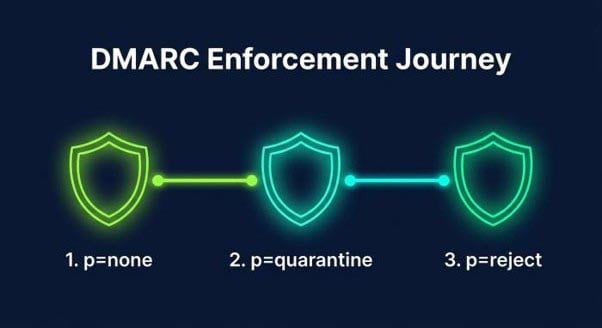
Start with a “None” Policy, then Escalate
Start the DMARC setup using `p=none` to observe email behavior without disrupting delivery. Analyze both aggregate and forensic reports to identify any unauthorized activities and refine your list of approved email senders.
Analyze DMARC Reports Regularly
Establish thorough reporting using the rua tag for aggregate data and the ruf tag for forensic events. Consistently review DMARC reports to spot misconfigurations or abnormal senders.
Tighten Alignment (adkim, aspf)
Tight DMARC alignment (adkim=s; aspf=s) provides improved protection against spoofing by allowing only domains that match exactly to succeed in the DMARC verification process.
Test and Validate Continuously
Prior to and following any modifications, utilize a DMARC record checker or testing tools. Automated validation of DMARC ensures that new senders, marketing platforms, or managed service providers (MSPs) do not compromise email authentication.
Finalize with Enforcement
After establishing confidence, transition to `quarantine` and ultimately `reject` to ensure the highest level of email security. This approach is essential for organizations to comply with standards set by providers such as Yahoo and Google, as well as to maintain brand integrity.
Maintain Accurate Records
Regularly update DMARC records whenever there are infrastructure changes. Conducting continuous checks and lookups of DMARC records helps avoid lapses in security, while maintaining correct record syntax guarantees compatibility with public tools and adheres to the policy and reporting standards set forth in RFC 7489.
By implementing these strategies, utilizing DMARC verification tools, and maintaining a robust DMARC framework, organizations can effectively counter emerging threats in 2026. This approach not only protects their domains but also enhances email deliverability and fosters reliable global communications.
