
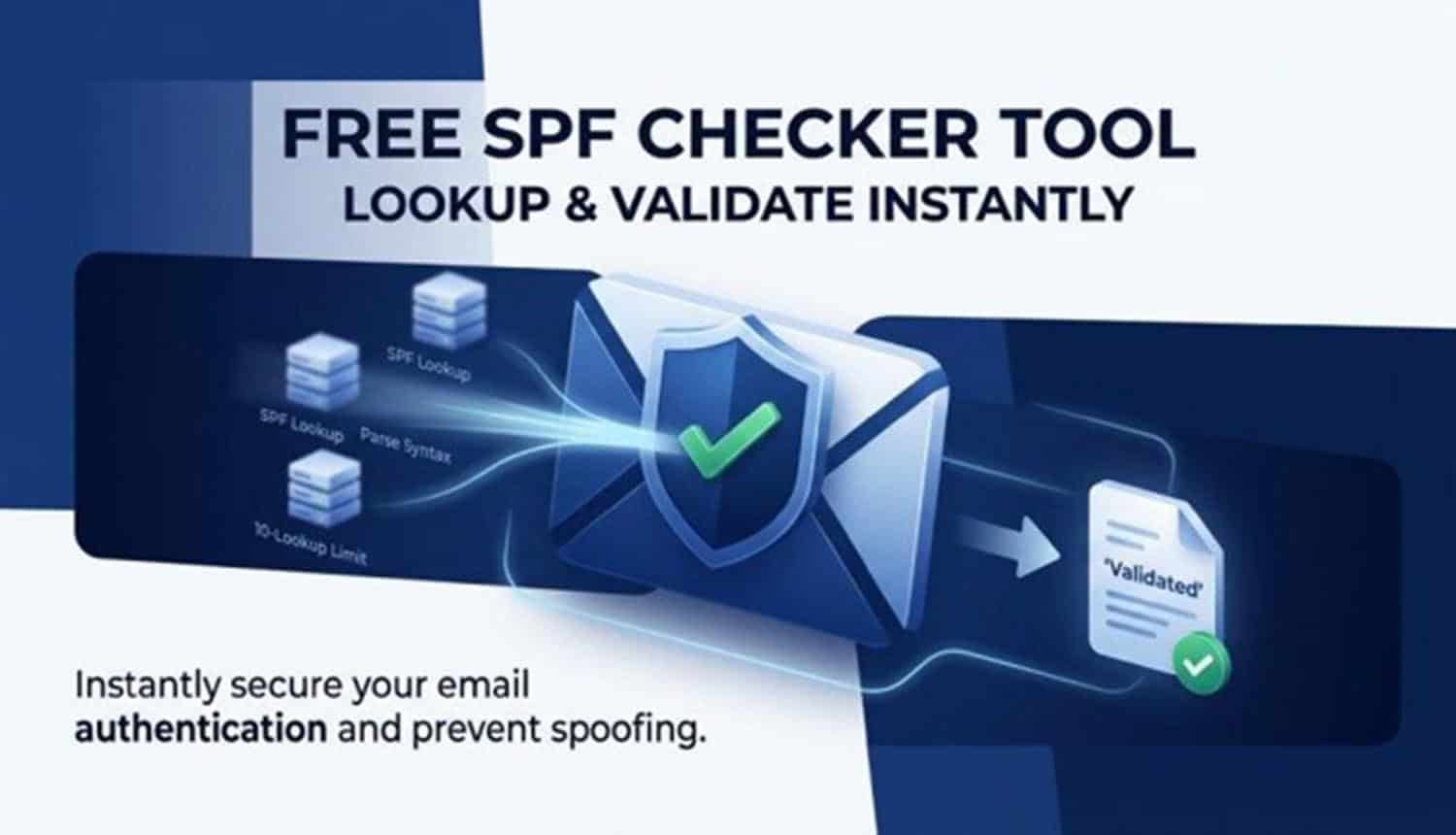

An SPF record is a DNS-based email authentication rule that tells Mailbox Providers which servers are allowed to send email for your domain. SPF stands for Sender Policy Framework, a protocol defined in RFC 7208 to help receiving systems verify whether a message came from an approved source.
A typical SPF record is published as a TXT record in your domain’s DNS records and starts with v=spf1. For example:
v=spf1 include:_spf.google.com include:spf.protection.outlook.com ip4:192.0.2.10 -all
This SPF record authorizes Google, Microsoft, and a specific IP address to send outbound emails on behalf of the domain.
Why Sender Policy Framework Matters
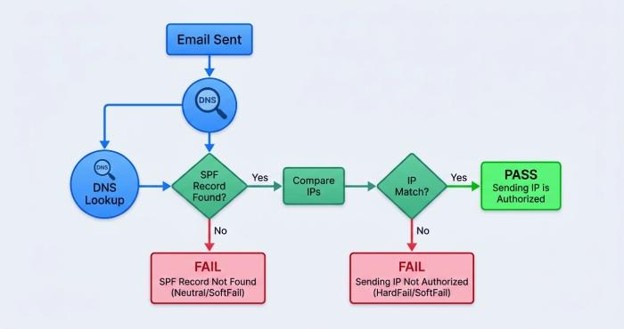
The Sender Policy Framework helps reduce email spoofing, phishing attacks, and other attempts to send fraudulent emails using your domain. When a receiving server gets a message, it performs an SPF check against the domain found in the envelope sender or return-path.
If the sending mail server is listed among the authorized IP addresses, the message passes SPF validation. If not, the message may fail the SPF check, affecting email deliverability, domain reputation, and broader email security.
SPF, DKIM, and DMARC in Email Authentication
SPF is one layer of email authentication, alongside DKIM and DMARC. DKIM, or DomainKeys Identified Mail, uses a cryptographic DKIM key to verify that a message was not altered. DMARC, or Domain-based Message Authentication, Reporting & Conformance, uses SPF and DKIM results to enforce a DMARC policy.
Together, SPF, DKIM, and DMARC improve domain authentication, strengthen DMARC compliance, and help organizations protect legitimate email traffic.
How a Free SPF Checker Tool Works: Lookup, Parse, and Validate Results
Step 1: SPF Record Lookup
A free SPF checker begins with an SPF record lookup. The tool queries a DNS server to find the TXT record associated with the domain. This process is similar to a manual DNS lookup using tools like nslookup or dig from a command prompt.
An SPF record lookup tool checks whether the domain has a valid SPF record, whether multiple SPF records exist, and whether the published value begins correctly with spf1.
Step 2: Parsing SPF Tags and Mechanisms
After the SPF record lookup, the SPF record checker parses the SPF syntax. It reviews common SPF tags and mechanisms such as:
- include
- ip4
- ip6
- mx
- a
- ptr
- exists
- redirect
- all
The include tag is commonly used for third-party email service providers such as Google Workspace via _spf.google.com or Microsoft 365 via spf.protection.outlook.com. The ip4 and ip6 mechanisms authorize IPv4 and IPv6 addresses. The mx mechanism allows hosts listed in the domain’s MX record, while the a record mechanism authorizes the domain’s A record.
Understanding Less Common SPF Tags
Some SPF tags require caution. The ptr mechanism relies on PTR record lookups and is discouraged because it can be slow and unreliable. The exists tag performs a DNS existence test, while the redirect mechanism points SPF evaluation to another domain’s SPF policy.
A reliable SPF diagnostic tool evaluates these SPF tags and warns about risky, outdated, or inefficient mechanisms.
Step 3: SPF Validation and Result Interpretation
Once parsing is complete, the SPF checker performs SPF validation. The result may show pass, fail, softfail, neutral, permerror, or temperror. A proper SPF test explains why a specific result occurred and whether your SPF policy is too strict, too broad, or misconfigured.
A good SPF record checker also displays the SPF lookup tree, including every nested include, DNS query, and sending source involved in the SPF check.
Why the 10-Lookup Limit Matters
SPF has a strict limit of 10 DNS mechanisms that require lookups. If your SPF record exceeds this limit, SPF validation can fail with a permanent error.
Example of a Risky Lookup Chain
A domain that includes Google, Microsoft, Verizon, CRM platforms, ticketing systems, and marketing tools may exceed the limit if each provider adds nested includes. An SPF diagnostic tool helps expose this problem before it damages email deliverability.
Common SPF Record Errors and How to Fix Them Instantly
Multiple SPF Records
One of the most common issues found by an SPF checker is multiple SPF records. A domain must have only one SPF record. If your SPF record lookup returns two TXT records beginning with v=spf1, SPF validation may fail.
To fix it, merge all legitimate sending sources into one SPF record and update it through your domain registrar or DNS hosting provider.
Invalid SPF Syntax
Incorrect SPF syntax can break email authentication. Common mistakes include missing spaces, unsupported characters, duplicate mechanisms, or placing all before other mechanisms.
For example, this is invalid:
v=spf1 -all include:_spf.google.com
The -all mechanism ends evaluation, so the include will never be checked. A strong SPF record checker identifies this immediately and suggests a corrected order.
Missing Authorized Sending Sources
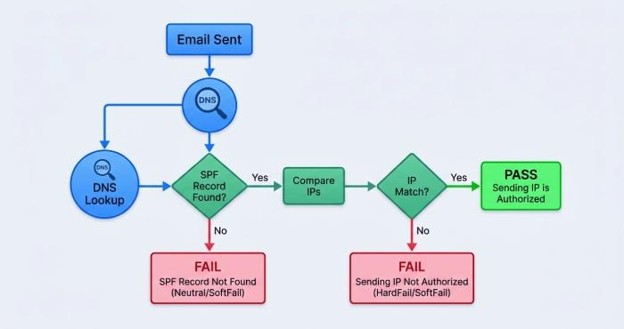
If a new email service provider is not included in your SPF record, legitimate outbound emails may fail the SPF check. This often happens when organizations add newsletter platforms, CRMs, billing tools, or helpdesk systems but forget to update DNS.
Use email traffic analysis, provider documentation, and periodic reports from DMARC platforms such as EasyDMARC to identify all approved sending sources.
Overly Permissive SPF Policy
An SPF record ending in +all allows any server to send mail for your domain, which defeats the purpose of Sender Policy Framework. It increases exposure to email spoofing and phishing attacks.
A safer SPF policy typically ends with ~all during testing or -all when your sending sources are fully verified.
Best Practices for Creating and Maintaining a Valid SPF Record
Start with Accurate SPF Record Examples
Good SPF record examples help you avoid common formatting mistakes. For Google Workspace, you may use:
v=spf1 include:_spf.google.com ~all
For Microsoft 365, a basic example is:
v=spf1 include:spf.protection.outlook.com -all
If you use both providers, combine them into one SPF record rather than publishing separate TXT records.
Maintain a Clean List of Sending Sources
To manage SPF record quality, keep a current inventory of every system that sends email for your domain. This includes your primary mail server, marketing automation platform, transactional email provider, CRM, payroll tool, and support desk.
Each sending source should map to an approved include, IP address, ip4, or ip6 mechanism. This approach improves SPF validation and strengthens overall email authentication.
Monitor SPF Limitations
SPF is useful, but it has important SPF limitations. It validates the return-path domain, not always the visible “From” address users see. It can also break during forwarding unless DKIM and DMARC are configured properly.
That is why SPF should not be used alone. Pair Sender Policy Framework with DKIM and DMARC for stronger email security and better DMARC compliance.
Use SPF Monitoring and Reports
Ongoing SPF monitoring helps detect unauthorized senders, broken includes, and DNS changes. Platforms such as EasyDMARC can provide periodic reports, visibility into authentication failures, and alerts when SPF validation starts failing.
Choosing the Right SPF Checker Tool for Better Email Deliverability
What to Look for in an SPF Diagnostic Tool
The best SPF checker should be more than a basic DNS lookup utility. It should work as a full SPF diagnostic tool that performs SPF record lookup, parses SPF tags, validates SPF syntax, and explains every SPF check result clearly.
Look for features such as:
- Real-time SPF record lookup
- Full SPF lookup tree visualization
- Detection of multiple SPF records
- SPF validation against RFC 7208
- Warnings for DNS lookup limit issues
- Clear recommendations to fix each SPF record error
An advanced SPF record checker should also show whether your domain uses related authentication controls such as DKIM and DMARC.
Manual SPF Check vs. Automated SPF Test Tool
A manual SPF check using nslookup, dig, or a command prompt is useful for technical troubleshooting. For example:
dig TXT example.com
However, manual review does not always reveal nested includes, lookup count problems, or subtle SPF syntax issues. A dedicated SPF check tool, SPF test tool, or SPF record checker automates the process and provides clearer guidance.
EasyDMARC and Managed SPF Options
Tools from providers such as EasyDMARC can help organizations validate SPF records, review DMARC compliance, and understand authentication performance. For domains with complex sending infrastructures, Managed SPF by EasyDMARC and other SPF record management services can simplify maintenance.
This is especially helpful for businesses using multiple platforms, including Google, Microsoft, Verizon, CRMs, marketing systems, and transactional email providers. A dependable SPF checker ensures your SPF record stays valid, your SPF validation remains reliable, and your email deliverability improves over time.
