


Front-end development plays a crucial role in creating the interactive and visual aspects of web applications that users engage with directly. It involves the use of HTML, CSS, and JavaScript, the foundational technologies that structure, style, and animate websites respectively. This expertise not only makes websites look good but also ensures they work smoothly, reflecting the quality of a front-end development service.
By the end of this article, you will have a basic understanding of how to use HTML to layout your web content, apply CSS to make it visually appealing, and write JavaScript to add interactive elements. Each section is designed to build your skills step by step, helping you grasp the essentials of front-end development clearly and effectively.
Understanding HTML: The Backbone of the Web
HTML, or HyperText Markup Language, is the fundamental language used to create the structure of web pages. It consists of elements marked by tags such as <h1> for headings, <p> for paragraphs, and <a> for links. Each tag serves a specific purpose: <h1> tags help organize content by defining major headings, while <p> tags handle ordinary text, and <a> tags link to other pages or resources.
Consider a simple HTML page structure:
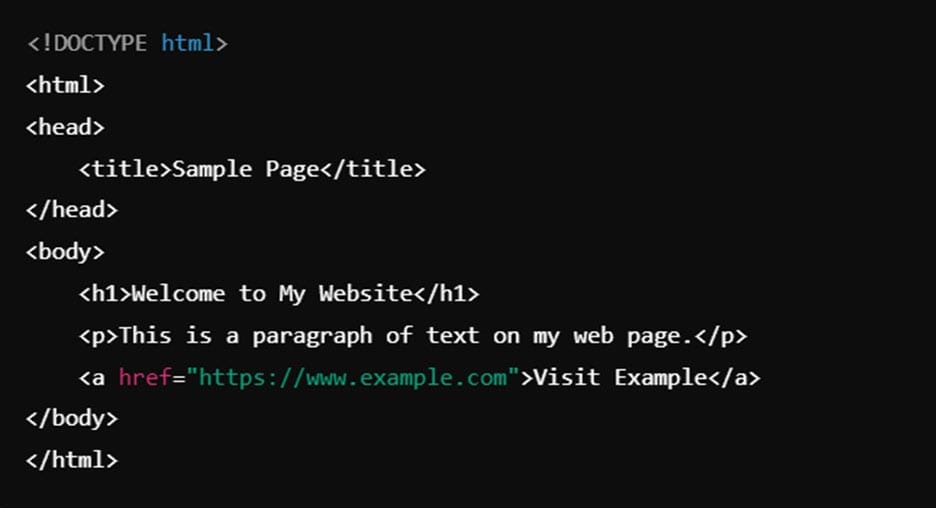
This example demonstrates how HTML uses tags to layout a web page, establishing a clear, functional structure that browsers can interpret to display content to users.
Styling with CSS: Making the Web Beautiful
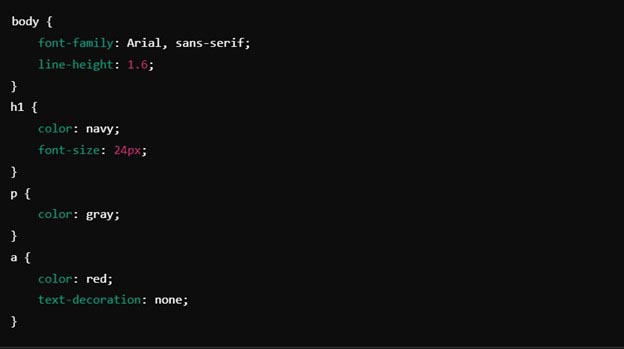
CSS, or Cascading Style Sheets, is what gives web pages their visual flair. It allows you to set the design elements of your HTML structure, including colors, fonts, and layout. CSS works by selecting HTML elements through selectors and applying styles to them using properties and values. For example, you can change the color of all paragraph text or alter the font size of your headings.
To see CSS in action, let’s apply some styles to the HTML example from earlier:
Bringing Interactivity with JavaScript
JavaScript is a scripting language that brings web pages to life by allowing developers to add interactive behaviors. It interacts with HTML and CSS to respond to user actions, such as clicks, over-hover effects, and data entry. The core of JavaScript involves writing instructions for the browser to execute, which might include handling variables to store information, using functions to organize code, and setting up event listeners to react to user interactions.
To illustrate, let’s add a simple JavaScript script to the HTML page we previously discussed. This script will display an alert when the user clicks on the heading:
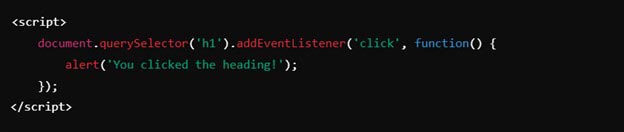
By embedding this script, the heading now serves as a button of sorts, showcasing how JavaScript enables elements on a page to interact dynamically with the user. Such functionality is fundamental to modern web experiences, turning static pages into engaging, interactive web applications.
JavaScript Libraries and Frameworks
JavaScript libraries and frameworks are tools that simplify complex coding tasks, streamline development, and enhance functionality, consistency, and efficiency in building web applications. Libraries provide pre-written code snippets for common tasks, reducing the need for repetitive coding, while frameworks offer a more comprehensive structure for application architecture, dictating the structure of your code and its execution.
Popular JavaScript Frameworks:
- React: Developed by Facebook, React is used for building user interfaces, particularly for single-page applications where responsive interaction is key.
- Angular: Maintained by Google, Angular is a full-fledged framework that provides robust tools and a strong infrastructure, including everything from network components to testing utilities.
- Vue.js: Known for its simplicity and flexibility, Vue.js is great for those new to front-end frameworks but also powerful enough for advanced applications.
- Node.js: Primarily used on the server-side, Node.js allows developers to use JavaScript to write server logic, supporting real-time data-intensive applications.
- Express.js: A web application framework for Node.js, Express simplifies the process of building server-side logic and handling HTTP requests, which makes it indispensable for web services and APIs.
What’s Next? How Can I Understand Front-End Development Better?
Well, first of all, it depends on why you want to learn about front-end development. Understanding front-end development better starts with clarifying your goals. Are you looking to manage or collaborate more effectively with a development team, or are you interested in hands-on coding? Here’s how you can deepen your understanding based on your intentions:
1. For Managing Development Projects:
- Learn the Basics: Start by understanding the fundamentals of HTML, CSS, and JavaScript through quick online courses or tutorials. This will help you communicate more effectively with your team.
- Project Management Tools: Familiarize yourself with tools like Jira or Trello that can help you manage projects and understand the workflow of front-end development tasks.
- Attend Workshops: Participate in workshops or webinars focused on tech management or the software development lifecycle. This will give you insights into the industry standards and challenges.
2. For Hands-on Coding:
- Interactive Learning: Engage with platforms like Codecademy or freeCodeCamp where you can write code directly and see the effects of your changes in real-time.
- Build Projects: Start small with personal projects like a portfolio website or a simple app. This practical experience is invaluable.
- Community Engagement: Join local or online coding communities. Platforms like Stack Overflow, GitHub, or even local meetups can provide support and feedback.
3. Stay Updated:
- Follow Industry News: Keep up with the latest in technology by following blogs, podcasts, and news sites dedicated to web development.
- Continuous Learning: Technology evolves rapidly. Enroll in advanced courses that cover new frameworks and tools as they become mainstream.
Your pathway to understanding front-end development better will depend on how deep you want to go into the technical details. Whether overseeing projects or developing them, staying curious and continuously learning are key to your growth in this field.
Final Thoughts
We’ve journeyed through the essentials of front-end development, from the structural precision of HTML and the aesthetic enhancements of CSS to the dynamic capabilities introduced by JavaScript. This guide has equipped you with the foundational knowledge needed to begin crafting your own interactive and visually engaging web applications. Whether your goal is to communicate more effectively with developers, or to take a hands-on approach to coding, the skills and concepts discussed here form the bedrock of modern web development.
As you continue your exploration of front-end development, remember that the field is ever-evolving with new tools, frameworks, and best practices. Stay curious and proactive by engaging with the latest educational resources and community platforms. By committing to ongoing learning and practical application, you’ll not only enhance your capabilities but also keep pace with the technological advancements shaping the digital landscape. This commitment will ensure your projects and skills remain relevant and impactful in the dynamic world of web development.
